Branches
Summary
Branches let you work on changes without treating every experiment as part of the main line of history. The practical idea is simple: a branch is another line of development that points at commits, so you can isolate work, test changes, and merge them later when they are ready.
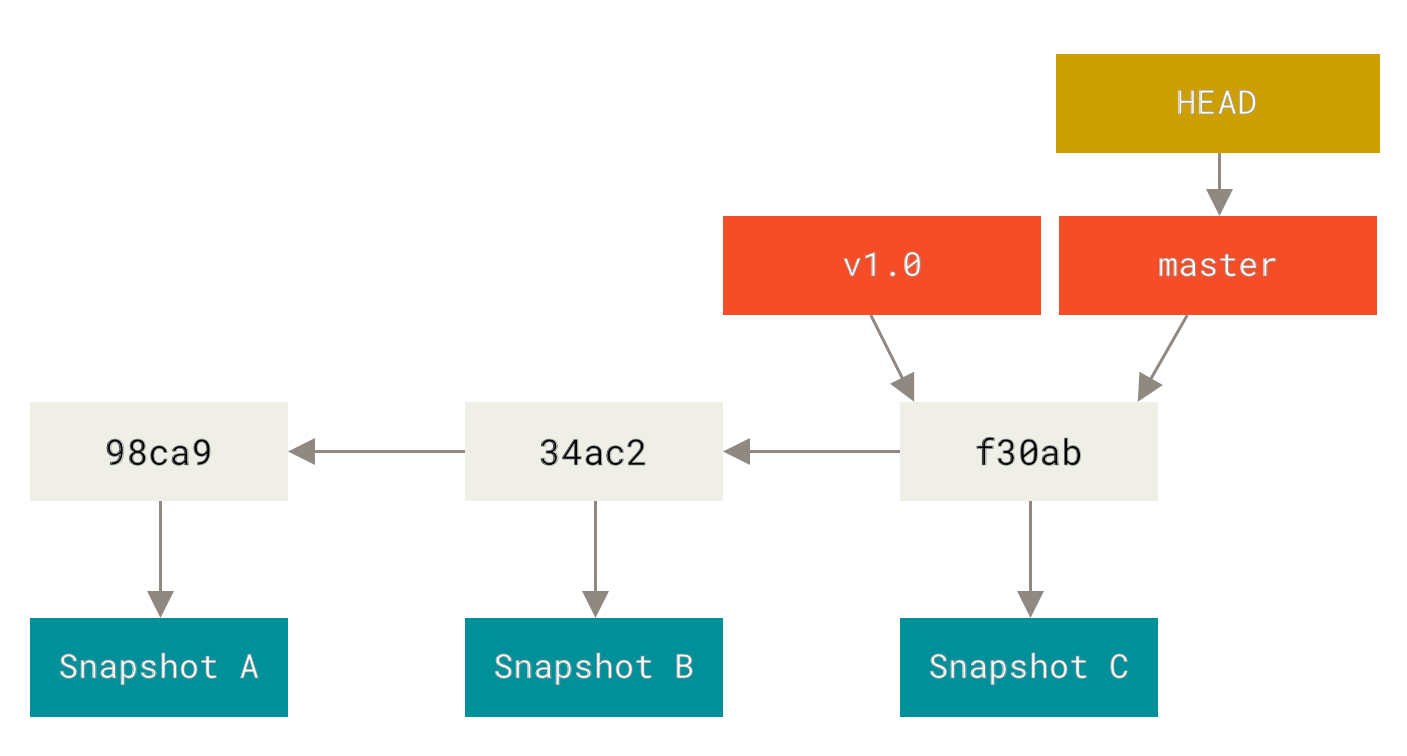
Official Git diagram showing how branch pointers and commit history relate to each other.
Why this matters
- branches are part of normal team and solo Git workflow
- they reduce risk by isolating unfinished work from the main branch
- if you do not understand branches, merge work, pull requests, and collaboration quickly become confusing
Environment / Scope
| Item | Value |
|---|---|
| Topic | Git branch model |
| Best use for this note | understanding safe parallel work in Git |
| Main focus | create, switch, inspect, merge mentally |
| Safe to practise? | yes, in a throwaway repo |
Key concepts
- Branch - a named pointer to a line of commits
- Main branch - the primary line of history, often
main - Feature branch - a temporary branch for one task or change
- Merge - bringing changes from one branch into another
- Checkout / switch - moving your working context to another branch
Mental model
Think about branches like this:
main
  \
   feature-branch
Both branches share history until they diverge.
This means:
- you create a branch from the current state
- you work there without touching
main - you merge it back when the work is ready
Everyday workflow
| Step | Typical command | Meaning |
|---|---|---|
| See branches | git branch | list local branches |
| Create and switch | git switch -c feature-x | make a new branch and move to it |
| Check state | git status | see current branch and changes |
| Switch back | git switch main | return to main branch |
| Merge work | git merge feature-x | bring feature branch commits into current branch |
Common misunderstandings
| Misunderstanding | Better explanation |
|---|---|
| ”A branch is a full copy of the repo” | it is mainly a movable pointer to commits, not a giant duplicate |
| ”Branches are only for teams” | they are useful even when working alone |
| ”Merging is the same as pushing” | merge changes local history; push sends commits to the remote |
| ”Main should be where I experiment” | experiments are usually safer in feature branches |
Verification
| Check | Expected result |
|---|---|
git branch | shows current local branches |
git status | shows current branch clearly |
git log --oneline --graph --all | shows branch history visually |
Pitfalls / Troubleshooting
| Problem | Likely cause | What to check |
|---|---|---|
| Changes appear on the wrong branch | work started before switching branches | git status, current branch |
| Merge feels confusing | mental model of commit pointers is weak | branch list, history graph |
| Branches pile up | no cleanup habit | old feature branches after merge |
Practical rule
If the change has a name, it can usually have its own branch.
Key takeaways
- a branch is a safe line of work, not a scary advanced feature
- branches help separate finished work from experiments
- most Git collaboration becomes easier once branches make sense mentally